Leandro: A Modern Display Font for Bold Branding
Testing Leandro on a Boutique Online Store Header
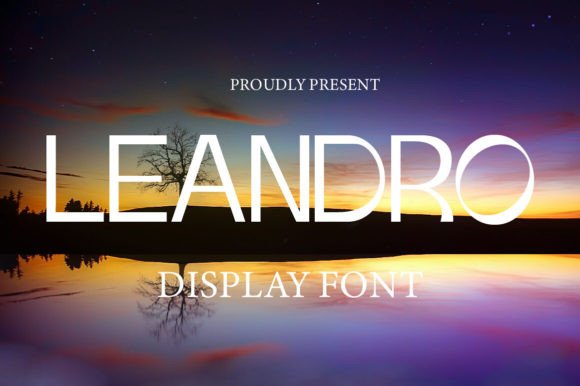
As I was working on the header of a boutique online store, I needed a display font that would stand out without overwhelming the design. Leandro, with its clean sans-serif features and bold character, immediately caught my eye. It felt modern, approachable, and just right for a brand targeting a younger, stylish audience. I dropped it into the hero section over a full-width image banner and watched how it played with the background—sharp, legible, and perfectly balanced.
Leandro has a confident yet minimal feel, making it ideal for headlines where you want to make an impression without distraction. Its use in this context helped elevate the overall brand tone, giving the site a polished look that aligned with the client's vision.
Using Leandro for Movie Titles and Creative Portfolio Headlines
I recently used Leandro on a creative portfolio homepage, specifically for the main project titles. The font’s subtle geometric shapes and open counters made it easy to read even at smaller sizes, which is crucial when designing for mobile users. When paired with a simple sans serif body font like Montserrat, the contrast helped guide the user’s eye naturally from the headline down to the supporting text.
For a movie title or a book cover preview, Leandro brings a fresh, contemporary edge. It works especially well on dark backgrounds or high-contrast layouts, where its sharp lines and clear forms shine. I noticed that the font didn’t lose clarity when scaled up, which is a big plus for large banners or promotional graphics.
Leandro for Brochures and Branding Materials
One of the most compelling aspects of Leandro is its versatility across different media. I tested it in a downloadable brochure template for a client who wanted a cohesive brand kit. The font’s sans-serif features allowed it to blend seamlessly with both digital and print formats. It looked great in the logo area, as well as in subheadings and call-out boxes.
What stood out was how Leandro maintained readability even when layered over images or textures. This makes it a strong candidate for use in social media graphics, campaign landing pages, or any branded content that needs to be visually engaging while remaining legible.
Designing a Course Sales Page with Leandro
I experimented with Leandro on a course sales page, placing it in the main headline and a few key selling points. The font’s modern aesthetic helped reinforce the idea that the course was cutting-edge and professional. It also worked well for short, punchy phrases like “Learn Fast. Grow Faster.”
When using Leandro in CTA buttons or section headings, I found that it added a touch of personality without being too flashy. It’s important to balance visual interest with usability, and Leandro did that well in this context. It also loaded quickly, which is always a plus for web performance.
Readability Considerations for Mobile and Responsive Layouts
As part of my testing, I checked how Leandro performed on smaller screens. Even at reduced sizes, the font remained highly readable, thanks to its clean structure and generous spacing. I made sure to avoid using it for long paragraphs or dense blocks of text, since that could affect scanning behavior. Instead, I reserved it for headlines, taglines, and other short-form elements.
When using Leandro on dark mode interfaces or light backgrounds, I noticed that the font’s contrast was consistent and never hard to read. This adaptability makes it a reliable choice for responsive designs that need to work across multiple platforms and environments.
Font Pairing Tips with Leandro
To create a balanced visual hierarchy, I paired Leandro with a complementary sans serif font like Open Sans for body copy. This combination provided a nice contrast between the decorative display font and the more utilitarian body text. For a more editorial feel, I also tried pairing it with a serif font like Playfair Display, which gave the layout a slightly more traditional, sophisticated vibe.
The key is to match Leandro with fonts that don’t compete for attention but instead support the overall design language. Whether it’s a sleek e-commerce site or a personal blog, the right font pairing can enhance both aesthetics and usability.
Commercial Use and Licensing for Web Projects
Before finalizing Leandro for a client project, I made sure to check the licensing options. The font comes with commercial use rights, which is essential for websites, online stores, and other digital assets. It also includes a variety of weights and alternates, giving me flexibility in how I applied it across different sections of the site.
Having access to webfont formats meant I could easily integrate Leandro into the site without worrying about compatibility issues. This streamlined the process and ensured that the font displayed consistently across all devices and browsers.